scraperspythondatasetsautomationrelease
Twenty scrapers that never open a browser
Twenty prebuilt collectors on a Python engine written from scratch, 462 typed columns, and a Google Maps search that went from eight minutes to six seconds.
Argus · · 14 min read
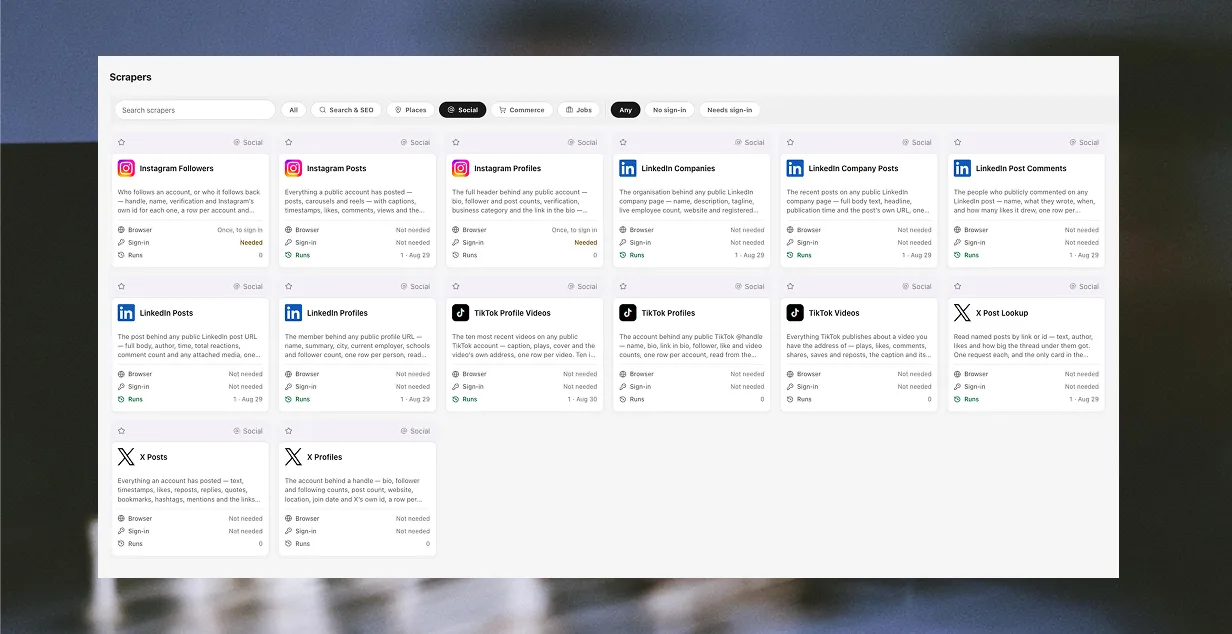
What ships today
A new tab, and a new kind of thing in it.
Until now everything Argus collected, it collected the way it does everything else: by opening one of your profiles in a real browser window, driving the page, and reading the DOM. That is the right architecture for operating an account you own, and it is a slow, heavy, fragile way to fetch a list of dentists in Rotterdam. A Google Maps search took eight to ten minutes of CDP round trips, enriched only the first forty results, and broke whenever Google renamed a class.
The same search now takes about six seconds, returns 47 columns per row, and opens no browser at all. It is one of twenty prebuilt collectors on the new Scrapers tab, built on a Python collection engine we wrote from scratch over the past month.
That is the headline. Underneath it, this is the largest release Argus has had: 715 files changed since the last one, checked by 211 test files, touching essentially every screen in the app. The automations surface, the AI workspace, the mail side and the whole sharing model all moved. The scrapers are what we want to talk about first, because they are new rather than better.
What a scraper is, and why it is not an automation
An automation has an enormous contract. It drives a real browser window on one of your profiles, through that profile's proxy and with that profile's cookies, and its 33 step types can do anything a person at a keyboard could do: navigate, click, type, branch, loop, ask a model, send mail, call another automation.
A scraper has a very small one:
Input in, one table out, and no browser at all.
That sentence is the whole design. You fill in a form — a search phrase, a handle, a company slug, a URL — press Start, and one typed dataset comes back. It does not open a window. It does not touch a profile's session unless you have explicitly given it one. It cannot branch, cannot loop over your accounts, cannot post anything. It collects, it files rows, it stops.
We used to model these as ordinary automations with a derived id, and it was a mistake we could see in the UI. A single Google Maps collector appeared in the Automations grid, in the step editor, in the schedule pickers, in the ⌘K palette and in the MCP tool list, and it spent one of a Free workspace's two automation slots to sit there. Four surfaces for a thing that has one form and one button.
So scrapers left the automations table entirely and got a record of their own. Practical consequences, all of them deliberate:
- They cost none of your plan's automation slots. On any tier, Free included. There is no install step and nothing to add — a card is available the moment it is listed.
- The catalogue is code; the instance is a row. There is one card per job, and your workspace grows a row for it the first time you run it, carrying its folder, the values you last typed and whether you pinned it.
- There is no "my scrapers" versus "store" split. A catalogue of twenty named services is the list. A second list of the ones you have already touched asks you to remember which of two screens a thing was on.
The rule that decides where something lives is about the target, not the mechanism. A workflow that operates your own accounts is an automation, even if it happens to collect rows. A collector pointed at somebody else's public page is a scraper, even if it is trivial.
Why Python, and what is actually running
Argus is an Electron app. Its launcher is TypeScript, its browser is a Chromium fork, and there was no Python anywhere in it. Adding an entire second language runtime to a desktop app is not a decision you make for fun, so it is worth setting out what it bought.
The engine is a sidecar: an embedded CPython 3.13.15, spawned once per run, speaking line-delimited JSON over stdin and stdout. The Node half is a few hundred lines that spawns it and kills it in the same finally block that closes a CDP session; the Python half is the collector. Fetching is done by Scrapling 0.4.15 (BSD-3), whose FetcherSession is pure HTTP on curl_cffi — no browser, no Playwright driver, no page.
The reason that matters is TLS. A script using a generic HTTP library while sending a Chrome user-agent has a TLS fingerprint no Chrome has ever produced, and that mismatch is decisive — it is the single most common way a naive scraper announces itself before it has sent a single header. curl_cffi impersonates a real browser's ClientHello: the cipher suites, the extensions, the curves and the order they are listed in. So these requests look like a browser's requests without a browser being there.
Everything else in the pipeline is ours, and it is the part that was written from scratch:
- A declarative collection vocabulary. A scraper card is data, not code — index paths into a decoded reply, a follow pattern, a pagination pair, and a closed list of transforms. This is a hard constraint rather than a stylistic one: a scraper that could ship arbitrary JavaScript would be unreviewable, and every card would be a program somebody has to audit. Adding a service is roughly sixty lines of configuration.
- Two ways to find the next address. A regex over the raw bytes, for a page that names the endpoint its own list loads from; or an index path into decoded JSON, for an API that hands you a cursor. Both exist because sites disagree about whether the address is in the document or is the document.
- A path step that names a value instead of pointing at it. X's timeline keeps its next-page cursor at
instructions[N].entries[M].content.value, and both indices move between replies. No fixed path addresses it. So a path step can also be a small dictionary of key–value pairs that a record must carry, matched by equality against literals and nothing else — which keeps a path exactly as reviewable as an index while surviving the site reshuffling its own list. embed, for when the data is an island in a page. A signed-out request for a LinkedIn profile returns about 620 KB of single-page-app shell carrying exactly oneapplication/ld+jsonscript block, and that block is the entire record. Without a way to lift it out, the collector sees HTML, fails to decode it, and reports a perfectly healthy page as a login wall. Five of the twenty cards read that one island.
Requests go out through the profile's own proxy, over socks5h:// so DNS resolves at the exit rather than on your machine — a detail worth stating because socks5:// leaks every hostname while appearing to work perfectly.
The catalogue
Twenty cards, one per job rather than one per service: a platform's profiles, its posts and the people who follow one are three different collections with three different forms and three different tables.
| Collects from | Cards | Examples |
|---|---|---|
| Places | 1 | Google Maps — 47 columns from a search phrase |
| Social | 14 | LinkedIn profiles, companies, posts and comments; Instagram; TikTok; X |
| Commerce | 1 | Shopify Storefronts — a store's catalogue with prices and variants |
| Jobs | 4 | Indeed, Greenhouse, Ashby, Lever |
462 typed columns across the twenty, and every one of them is documented on that card's own page — its real form, and every column of the table it creates. Those pages are generated from the app's own catalogue rather than written by hand, so the list is what ships rather than a description of it.
Every card carries a captured fixture of the real markup or the real reply, committed to the repository, and the parser is tested against it. That is the difference between "we checked it worked" and "it cannot silently stop working" — a fixture written to make a test pass proves nothing, so each one is a capture of the actual page.
Signed out, on purpose, with two exceptions
Eighteen of the twenty collect signed out, and that is a legal position rather than a technical convenience.
The two cases that shaped it point in opposite directions. Bright Data scraped Meta while signed out and won. hiQ scraped LinkedIn while signed in and lost. Reading a public page that anybody can load is settled ground; presenting an account's credentials to get at the same data is not, and it moves a question from settled to open.
So a card that needs an account is a decision taken on its own merits, not a default. Two of them do:
- Instagram Profiles — Instagram no longer answers a signed-out request for a profile's bio, follower counts or bio link. It returns a stub.
- Instagram Followers — a follower list is the one thing Instagram answers only to a signed-in request. Signed out, every endpoint that serves one returns
401 login required, from any address.
The test is whether the site leaves a signed-out source at all — not whether signing in would return more. LinkedIn is read entirely signed out here for exactly that reason, all five cards, off the JSON island described above.
Even for the two exceptions, no browser window opens to collect. One opens once, by hand, so you can log in; every request after that is the same plain HTTP every other card makes. Use a throwaway account: automated collection is against these sites' terms, and the account carrying it is what gets disabled.
Every row a scraper writes records how it was collected — which platform, when, which identity, and whether it was signed in. That is not decoration. Six months later, "where did this list come from" is a question you need a table to answer, not a memory.
The bug that made all of it look broken
One thing from the build is worth writing down, because it is the failure mode every scraper has and almost none report.
The collector never read the HTTP status. A 400, a rate limit and a login wall all arrived as rows: [], with no error attached, and the run screen faithfully reported them as "that search returned nothing." Three completely different problems — one is your query, one is your proxy, one is your account — rendered as the same sentence, which is the one sentence that suggests you should try a different search.
It now raises with the site's own words on the first page, and stops on a later one while keeping the rows already in hand. And when a collector finds nothing on a page that clearly has content, it diagnoses itself rather than reporting zero: what each candidate selector matched, and what the page actually repeats. "No rows" and "the markup moved" are the same output otherwise.
Running one, three ways
Open the Scrapers tab, pick a card, fill in its form, press Start. Every run started there makes a new table, named after what you searched for and when, filed in a folder named after the scraper — so two runs of the same card never overwrite each other. If you want to check first, Check collects one page, writes nothing, and reports which columns came back filled.
You can also never open the tab at all:
- Ask the assistant. It has the whole catalogue, so "collect the dentists in Rotterdam" is a sentence rather than a form.
- Give it to an outside agent. The same tools are on the MCP server — 141 tools over 131 local endpoints, on every plan including Free.
- Put one inside a workflow. A Run scraper step makes a collector a node in an automation. That step is the one caller that can overrule the table-per-run rule: pointed at a table you name, it creates that table if it is missing and files every run into it afterwards — appending, or updating rows in place on a column you match on. A scrape on a schedule then grows one table instead of leaving one behind every night.
What moved everywhere else
The scrapers are the new thing. They are not most of the diff.
Automations. A Run scraper step and a browserless Fetch page step, so a workflow can collect without a window. An installed recipe can now take an upstream fix — the detail panel says when your copy differs from the catalogue and offers to replace the four fields the template owns, leaving your name, folder, colour, pin and schedule wiring alone. Two run-dialog faults that made a real run impossible: a per-profile form that closed after every keystroke (so you could get exactly one character further on each reopen), and a ghost variable left behind by a renamed parameter that laundered itself through the override layer into every run.
AI. The assistant can now drive a real page rather than only author steps for one — snapshot, click, type, press, scroll, wait, extract, tabs, screenshot — with every action recorded as the step that would replay it, so a session you drove by hand can be saved as a workflow. It runs subagents in parallel. It refuses a screenshot up front on a model the catalogue knows is text-only, naming the tool to use instead, rather than failing a turn later as a raw provider 400 with no remedy in it. And the local API and the assistant now expose the same surface, held level by a test that runs against the real route table rather than a fixture — the two had drifted far enough apart that asking one for something the other could do got you a confident, wrong answer.
Mail. Outbound split into two lanes, because it is two different things. Your own mailboxes carry cold mail, with a sending pool, a warm-up, jitter and the profile's proxy. A broadcast connector carries opt-in mail through a provider built for it. This is not a preference: every ESP's acceptable-use policy prohibits cold outreach, purchased lists and scraped contact data, and the penalty is the account rather than a bounce. An address-verification step sits in front of both. Both share one send ledger, one suppression list and one repeat guard, because those protect a person rather than a mailbox. Mail → Suppressions exists now, which two error messages had been telling people to visit for weeks. Plus a rich-text composer, and more than one Telegram account per workspace.
Everywhere else. A ⌘K palette that searches across every tab. Per-record sharing on datasets, automations, mailboxes and schedule entries, with a Publish button for private ones. Projects are shared with the workspace now. A rebuilt Team tab that shows the workspace's machines beside its roster. Boot deadlines, so a launcher that used to say "Preparing Argus Launcher" forever now names what it is waiting for and gives up on it. And a second app icon, because people asked.
What none of this does
Worth being specific about the edges rather than adding another paragraph of reassurance.
There is no "scrape this URL for me." A scraper is a card for a named service, written and measured against that service's own replies. For a site no card covers, build an automation — that drives a real profile with a real browser and can do anything, at a browser's speed.
A scraper will not drive a page. No clicking, no forms, no logging in as part of a run. Anything with a real interaction in it is an automation by definition.
Twenty is not fifty. Travel and general-web collectors are designed and unwritten. We would rather ship four job boards that are pinned to captured fixtures than twenty cards that were true the week they were written.
The usual two. The builds are macOS on Apple Silicon and Windows 10/11 on x64 — no Linux, no Intel Mac. And the local API is a loopback server on your own machine rather than a hosted service, which is deliberate but does mean there is nothing to call from a server you do not own.
The short version
Twenty prebuilt collectors, 462 columns, no browser window, none of your automation slots. Eighteen of them collect signed out and the two that do not say why on their own page. They run from a form, from a sentence to the assistant, from an outside agent over MCP, or as a step inside a workflow on a schedule.
The catalogue is here, with every card's real form and every column of the table it writes. Download is here, and the changelog has the rest of what moved.
Read next
scrapers
The Two-Lane Rule for Cold Email