
Use case
Argus for anonymous research
Look at something without it looking back at you: every session opens clean, behind its own proxy and its own coherent fingerprint, and leaves nothing behind when it closes.




Some work cannot be done from your own browser. Checking what a competitor shows a buyer in another country, reading a forum you would rather not be a known reader of, confirming that the ad your client is complaining about really does run in Poland — all of it is ordinary, and all of it is easier when the session is not attached to you. The four sections below are what Argus separates, and the fifth is what it honestly does not.
Isolation
Every session opens clean and leaves nothing behind
An ordinary browser is a running record of everywhere you have been. Cookies from last month, storage a script wrote in the background, a cache that says which images you already have — a site does not need to ask who you are when the browser volunteers it.
Each Argus profile starts from its own directory: its own storage, its own cache, its own cookie jar, with session restore disabled so a previous run cannot resurface in a new one. The proxy is applied at the network layer rather than through an extension a page can detect, and a default block list covers the remote-access ports sites probe to spot automation. Two pieces of research done in two profiles have nothing in common to find.
Fingerprints
Blend in rather than disappear
The instinct is to block everything, and it is the wrong one. A browser that refuses to report a canvas, has no fonts, claims no GPU and sits in a timezone that contradicts its language is not anonymous — it is the most distinctive visitor of the day. Anti-fingerprinting that works looks like an ordinary machine, not like an absence.
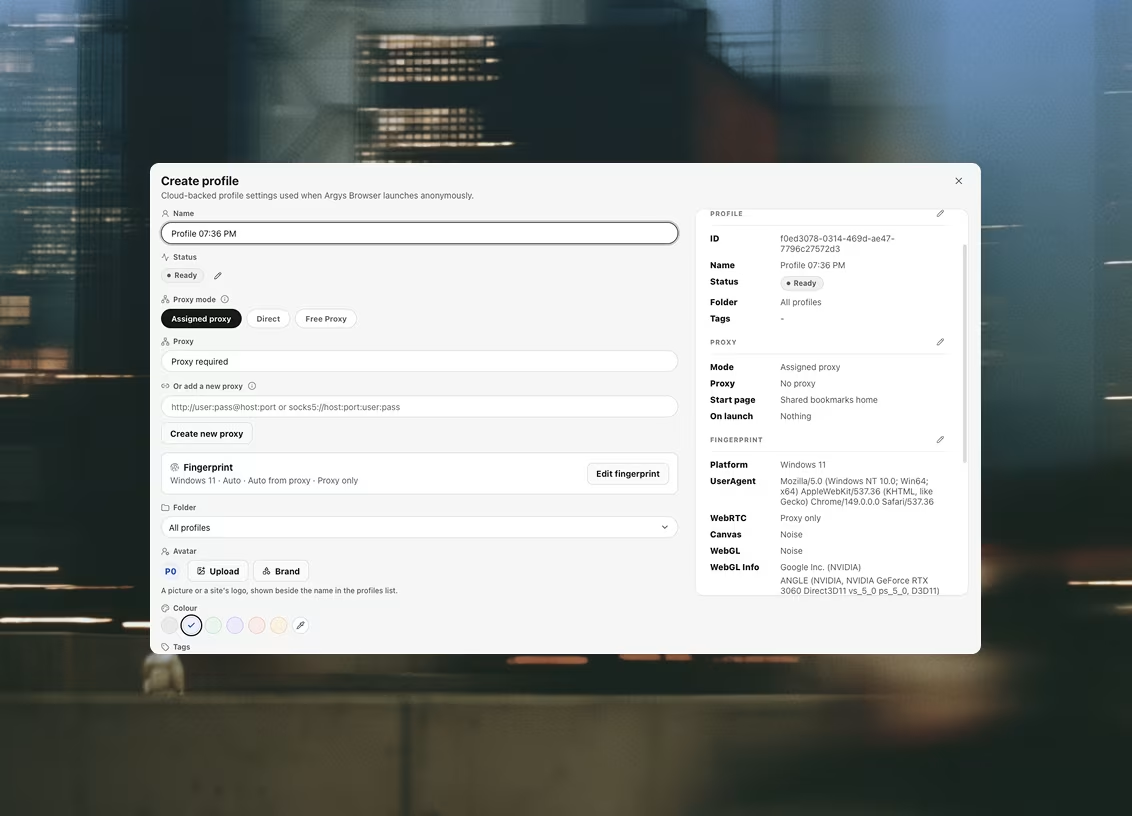
Argus generates a coherent hardware identity per profile: platform, CPU cores, memory, screen, timezone and languages produced together as one set, with the user-agent and its UA-CH metadata generated to match. Canvas, WebGL — including the reported vendor and renderer — and audio are handled in the renderer, so a script reads the spoofed value because it is the only value present, not because a wrapper hid the real one. Each surface can run as real, noise, off, or a value you pin yourself.
Proxies
Arrive from somewhere that is not your desk
Bring proxies from whichever provider you already use — Argus does not sell bandwidth and does not route your traffic — and assign one per profile from the shared library. HTTP and SOCKS5 both work, including the authenticated SOCKS5 variant plain Chromium cannot speak at all.
Two behaviours matter more here than anywhere else. A proxy that fails its health check blocks the launch instead of falling back to your own connection — the fallback is how a careful session accidentally arrives from your actual address. And WebRTC leak protection is enforced as browser policy on every profile, beneath the JavaScript layer, so a page cannot read your real address around the proxy. It is applied to every profile rather than being a toggle you can forget.
Profiles · Cookie sets
A persona you can come back to
Research is rarely one sitting. A profile keeps its identity, its proxy and its cookie jar between launches, so the account you registered a fortnight ago opens on the same device it was created on rather than looking like it has moved countries and changed computers.
Sessions can be saved as cookie sets and reassigned, and profiles carry tags, status labels and notes so a long-running piece of work does not depend on remembering which of them was which.
The honest part
What this is not
Argus is an anti-detect browser. It changes what a website can attribute to you and how easily two of your sessions can be joined. That is a real and useful thing, and it is the whole of what we claim.
It is not Tor and it is not a VPN. Your traffic goes to whichever proxy you chose, and that operator can see it — choosing them is a decision you are making, not one we make for you. It is not protection against an adversary with legal reach over your provider, your device or your accounts. And it does nothing about what you type: a persona that signs into a real account, or reuses a name, has identified itself, and no browser setting undoes that.
If you are doing this as reporting, the neighbouring page is written for that: Argus for journalists. What we do with your own data is a separate question, answered in the privacy policy.
Questions this comes with
Is this a VPN?
No. A VPN moves all of one machine's traffic through one tunnel; Argus gives each browser profile its own exit through a proxy you supply, and does the other half of the job — the device the session presents — inside the browser itself. It is also not Tor: there is no onion routing and no protection against an adversary watching the network. If your threat model needs genuine anonymity rather than separation, use the tool built for that.
Does anything I look at leave my machine?
The browsing session does not. Cache, local storage and the live cookie jar stay in that profile's own directory on the machine that ran it. What syncs to your workspace is the configuration — profile definitions, proxies, cookie sets, folders, status labels and shared extensions — so it follows you between machines. The browser itself receives one launch payload and has no credentials and no knowledge of your account.
Do I have to buy proxies to use it?
No. A profile can be assigned a proxy from your library or run on a direct connection, and the choice is per profile. A proxy is what separates the network half of an identity, so research that should not trace back to your own address wants one; a throwaway session that does not care can go direct. Argus sells no proxies and takes any HTTP or SOCKS5 endpoint from any provider.
Does closing a profile wipe what it did?
No, and that is deliberate — a profile keeps its own directory so it opens tomorrow where you left it today. What it never does is share that state with another profile, and session restore is off so a previous run's tabs cannot resurface inside a new one. If you want a session that starts from nothing, start a fresh profile; deleting one is soft, so it waits in Trash and can be restored.
Can I run it on Linux, or on a phone?
No. The builds are macOS 13 Ventura and newer on Apple Silicon, and Windows 10 and 11 on x64. There is no Linux build, no Intel Mac build and no mobile app, and there is no hosted version — both programs run on your own machine, which is the same reason there is no cloud runner for automations.
Related use cases
Teams next door run into the same three problems
Journalists
Research under an identity that isn't yours: every session opens clean, behind its own proxy and its own coherent fingerprint.
Crypto & Web3
A profile per wallet and a profile per exchange account: each one its own browser, its own proxy and its own coherent device, so nothing you run links back to anything else you run.
Bounties & airdrops
A profile per entry: its own device, its own exit IP and its own cookie jar, so a campaign that checks whether two wallets came from one machine finds nothing to join.

Ready to run profiles at scale?
Download Argus for Mac or Windows and start free with 5 profiles.