
Use case
Argus for journalists
Research under an identity that isn't yours: every session opens clean, behind its own proxy and its own coherent fingerprint.




A reporter's browser is a liability. It carries your logins, your history, your newsroom's IP address — and every page you open for a story can read enough of it to know who is asking. The six situations below are where that costs you, and how the same research runs in Argus.
Isolation
Open the page without introducing yourself
Every Argus profile starts from its own directory — separate storage, cache and cookie jar, with nothing carried over from any other profile. The session you open to read a company's careers page, or a forum you are watching for a story, knows nothing about the session where you are signed into your email, your CMS, or your own social accounts. Session restore is disabled, so a previous run cannot resurface in a new one.
That cuts both ways, and both matter: the subject of the story cannot connect the visit to you, and your accumulated browsing cannot contaminate what the site decides to show the visitor. You see the page a stranger sees, not the page your history has earned.
Fingerprints
The machine they see is not the machine you own
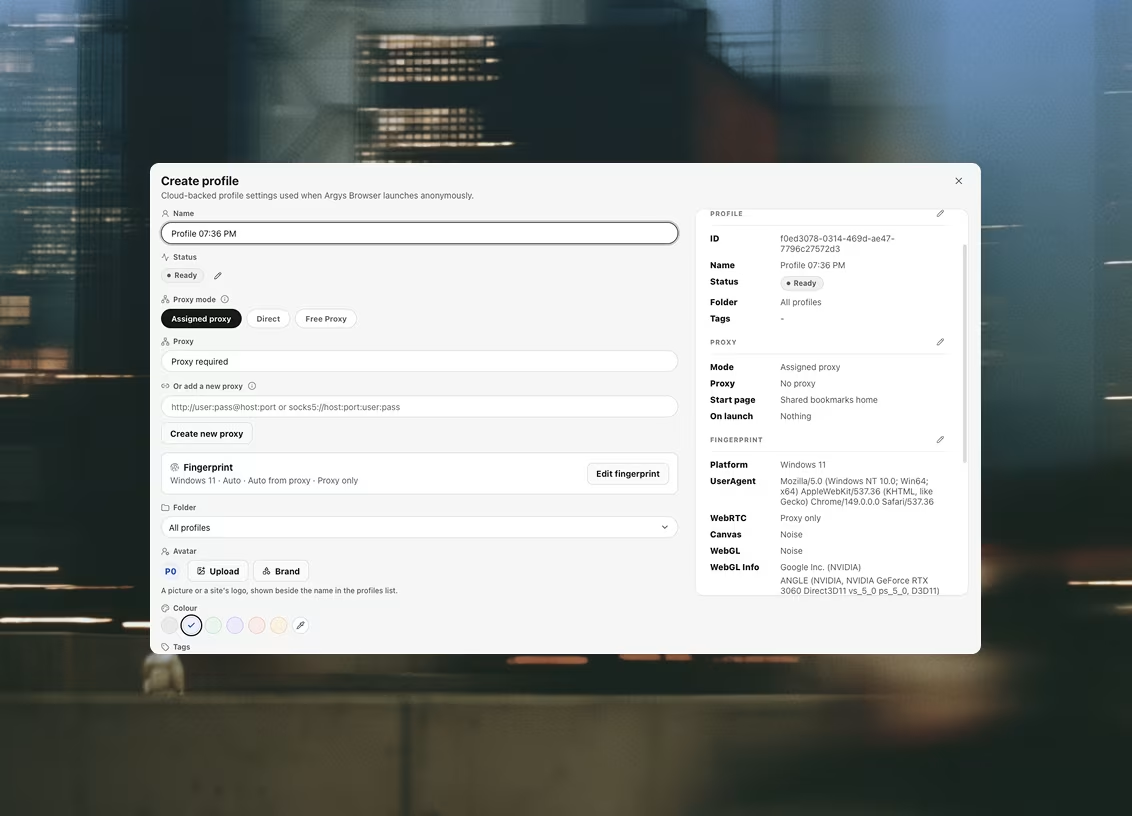
Sites do not need a login to recognize you — the hardware is enough. Canvas, WebGL, screen, timezone, CPU cores: together they name your laptop nearly as reliably as a cookie. An Argus profile presents a generated hardware identity instead — platform, memory, screen, timezone and languages produced together as one coherent set, so nothing contradicts anything else. The spoofing is applied in the renderer, below the page: a script sees the spoofed value because that is the only value present, not because a wrapper hid the real one.
Each profile keeps its identity across launches. The account you use to watch a Telegram channel looks like the same believable machine every morning — just never like yours.
Proxies · WebRTC
Read the story from where it is happening
Prices shown only to one country, a politician's ads targeted at one region, a page that serves different text to different geographies — verifying any of it means arriving from there. Assign the profile a proxy from the shared library and the whole session arrives from that geography. Argus health-checks every proxy and reports the egress IP, its country, and the latency — and a proxy that fails its check blocks the launch entirely, instead of quietly falling back and stamping your newsroom's IP onto the visit.
WebRTC is sealed as browser policy on every profile — a page cannot read your real address around the proxy, and it is not a toggle you can forget to set. Authenticated SOCKS5, the variant plain Chromium cannot speak at all, is handled inside the browser.
Profiles · Cookie sets
A persona that survives longer than one afternoon
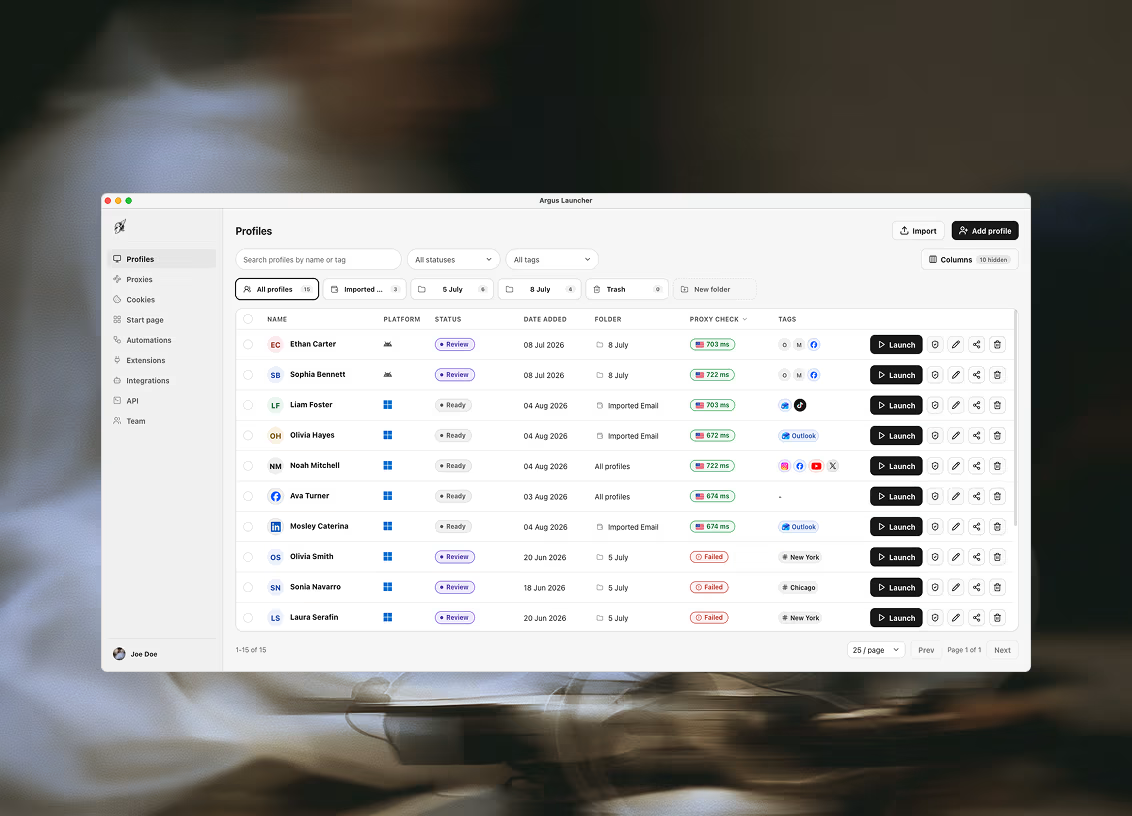
Monitoring a community for months means the account doing the watching has to stay consistent: same identity, same sessions, same logins. In Argus that persona is a profile — its cookies live in the profile's own jar, and a login saved as a cookie set is seeded into the session at launch, so the profile opens already signed in every time.
A beat becomes a folder of profiles: each row with its own status label and notes — which source it watches, when it was last used, what it must never be used for. Deleting is soft, so a persona retired at the end of a story can be restored if the story reopens.
Reach · Datasets
Build the source list first, then work it under a persona
Before you can watch a beat you need the list: the channels, the subreddits, the feeds, the accounts worth checking every morning. Gathering that does not need a browser session, and Argus has a step that does it without one. Reach pulls a page through its own channels — a YouTube channel, a subreddit or an RSS feed answer as structured rows, one per video, post or item, and an ordinary page answers as readable text.
It runs from the launcher's own connection, which is the trade worth understanding: it is fast and costs you no session, but it does not use the profile's proxy or cookies, so the site sees your real address. Use it for public feeds and pages you would not mind being seen reading — and a browser profile for anything else. A login-gated page needs the browser regardless.
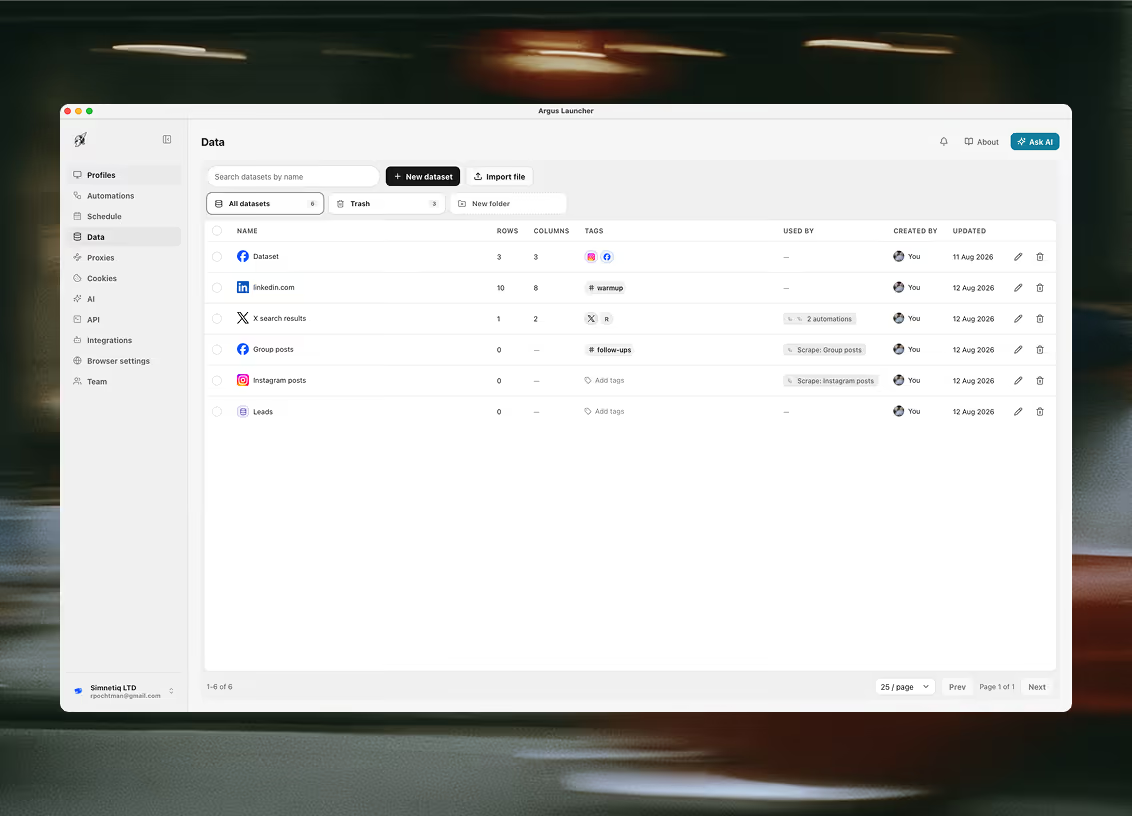
Save what it finds into a dataset and the list stops being a scratch file on one laptop: a table your workspace owns, with columns you named, that you can sort, filter, tag and hand to the colleague covering for you. Put the gathering step on the calendar and it refreshes itself before you are at your desk.
Then work the list under a persona. The rows that need an account behind them — the community that hides its posts from logged-out visitors, the group you had to be admitted to — get opened by the profile you built for that beat, with the same fingerprint, the same cookies and the same proxy every time. The two halves are deliberately different tools: one is cheap and anonymous, the other is careful and consistent, and spending a persona on a task that never needed one is how personas get burnt.
Questions this comes with
Is this Tor? Does it make me anonymous?
No on both counts, and the distinction matters for safety. Argus is not an anonymity network: there is no onion routing, no traffic mixing and no protection against an adversary who can watch the network. It is a way to keep separate research identities from resolving into one person — a profile per persona, each with its own storage, its own coherent device and its own exit IP through a proxy you chose. For threat models that need real anonymity, use the tool built for that.
Can two research personas leak into each other?
Not through storage or the device. Each profile is backed by its own user-data directory — separate cookies, cache, local storage, service workers — and session restore is off, so a previous run cannot resurface in a new one. Each profile also presents its own generated hardware identity, and each can leave through its own proxy. What no browser can separate is behaviour: writing style, working hours, the accounts you contact.
Can Argus see what I browse?
No. Your profile definitions, proxies, cookie sets and folders sync to your organization so they follow you between machines, but the browsing session itself — cache, local storage and the live cookie jar — stays in that profile's own directory on the machine that ran it. The browser is handed one launch payload and nothing else: it has no credentials, cannot sign in, and knows nothing about your account.
Do I need proxies for research work?
For anything where the site should not learn your newsroom's address, yes. Argus does not sell proxies and takes any HTTP or SOCKS5 endpoint, including SOCKS5 that requires a username and password. WebRTC leak protection is applied as browser policy on every profile rather than as a toggle somebody forgets, and a proxy that fails its health check blocks the launch instead of falling back to your real connection.
Can a persona stay consistent over months?
Yes — that is the difference between a persona and a throwaway session. The fingerprint is stored on the profile and reapplied at every launch, so the device it presents next quarter is the device it presented last, and its cookies and storage are still in its own directory. Keep the same proxy with it; an address that changes between visits is one of the things a long-lived account is judged on.
Related use cases
Teams next door run into the same three problems
Anonymous research
Look at something without it looking back at you: every session opens clean, behind its own proxy and its own coherent fingerprint, and leaves nothing behind when it closes.
Creators
One creator, several channels, several platform accounts: a profile each, so a strike on one never reaches the others and a manager can open any of them without ever holding your password.
Web scraping
Two ways to collect, and a table your workspace owns at the end of both: prebuilt collectors that open no browser window at all, and a real profile behind your own proxy for the pages that have to be driven.

Ready to run profiles at scale?
Download Argus for Mac or Windows and start free with 5 profiles.