Reference
Integrations
Argus speaks the Model Context Protocol, so an agent that already knows how to use tools can drive your profiles without being taught an API. Connecting installs nothing.
On this page
Agents over MCP
MCP is how a coding agent discovers what a program can do. The agent asks for a tool list, gets one back with names, descriptions and argument schemas, and calls what it needs — no wrapper, no SDK, nothing to keep in step with a changelog.
The Argus server runs from inside the launcher's own application bundle, started with ELECTRON_RUN_AS_NODE. There is no package to install and nothing new listening: it speaks JSON-RPC over stdin and stdout to the client that launched it, and reaches the local API on your behalf.
For most clients the launcher writes the config file for you and shows you the path first. Two of them have no file it can write, and say so by handing over a snippet instead.
This is a local API. It listens on loopback on the machine running Argus, and nothing off that machine can reach it. There is no hosted web API.
The API and the MCP tools are on every plan, including Free. A plan sets how many profiles, seats and automations a workspace gets — it does not decide whether the API answers. What the server is, what an agent can reach through it and where its reach ends is on the MCP page; what follows here is the wiring.
Supported clients
Coding agents

Claude Code
Anthropic's coding agent CLI. Drive profiles as tools from any project.
- Config
- ~/.claude.json
- Key
- mcpServers.argus
Run /mcp in any project — argus should be in the list.

Codex
OpenAI's coding agent CLI. Same tools, wired into Codex's own config.
- Config
- ~/.codex/config.toml
- Key
- [mcp_servers.argus]
Codex reads its MCP servers at startup — ask it what tools it has and the argus ones should be there.

Cursor
The AI editor. Registered in Cursor's global MCP config.
- Config
- ~/.cursor/mcp.json
- Key
- mcpServers.argus
Open Cursor Settings → MCP: argus should be listed and switched on.

Gemini CLI
Google's coding agent CLI. Same tools, in its own settings file.
- Config
- ~/.gemini/settings.json
- Key
- mcpServers.argus
Run /mcp — argus should be in the list.

Windsurf
The Codeium editor. Registered for Cascade to use.
- Config
- ~/.codeium/windsurf/mcp_config.json
- Key
- mcpServers.argus
Open Cascade's plugin panel: argus should be listed there.

VS Code
Agent mode in Visual Studio Code, through its user MCP config.
- Config
- Code/User/mcp.json
- Key
- servers.argus
Switch Chat to Agent mode and open the tools picker — the argus tools should be listed.

Zed
Zed's agent panel, through its context server settings.
- Config
- ~/.config/zed/settings.json
- Key
- context_servers.argus
Check the agent panel's settings: argus should appear under context servers.
Automation

OpenClaw
Personal assistant gateway across chat channels.
- Config
- ~/.openclaw/openclaw.json
- Key
- mcp.servers.argus
It loads its config at startup — argus should show up among its tools.
Set up by hand
These two have no config file Argus can write. Connecting them means handing over a snippet rather than pretending to wire them up.
Hive
by handMulti-agent runtime. Run QA and monitoring sweeps across many profiles at once.
- Config
- its own .env
- Key
- environment variables
Hive reads the .env at startup — its first sweep will use this key.

Any other MCP client
by handAnything that speaks MCP. Copy the server block into its config yourself.
- Config
- whatever your client reads
- Key
- mcpServers.argus
Your client should list argus among its MCP servers once it is back up.
Setting it up by hand
For everything above except Hive and “Any other MCP client”, Argus writes this block for you and shows you the file path before it touches anything. If you would rather do it yourself, or your client is not on the list, this is the shape.
{
  "mcpServers": {
    "argus": {
      "type": "stdio",
      "command": "Argus Launcher",
      "args": ["<the path shown after you connect>"],
      "env": {
        "ELECTRON_RUN_AS_NODE": "1",
        "ARGYS_API_TOKEN": "<your key>",
        "ARGYS_API_BASE": "http://127.0.0.1:39219"
      }
    }
  }
}
Hive reads environment variables out of its own .env instead:
ARGYS_API_BASE=http://127.0.0.1:39219
ARGYS_API_TOKEN=<your key>
Restart the client afterwards. Every one of these reads its MCP config at process start and there is no reload signal Argus can send.
What an agent gets
143 tools, and the instructions the server hands the model on connect:
Drive Argus anti-detect browser profiles. Each profile is an isolated browser identity with its own proxy, fingerprint and cookie jar. Typical flow: argus_list_profiles, then argus_launch_profile, then argus_navigate / argus_read_page / argus_screenshot, then argus_close_profile. A launched session carries whatever identity the profile already holds, including its cookies — do not send it anything the profile is not meant to have. The launch reply carries a `warnings` array: a non-empty one means that profile shares its cookie-set or its proxy past the limit, so tell the user rather than opening a batch silently, and call argus_sharing_report before a batch to see the whole picture in one call. This workspace may also hold PROJECTS: named pieces of work that span profiles, proxies and automations, each with a goal, a set of rules and the notes and runbooks the in-app assistant keeps about it. Call argus_list_projects to see them and argus_project_context for one project's brief and rules — read those BEFORE acting on anything the project holds, because they are where its constraints are written down. Every other document is exposed as a resource (argus://project/<id>/<path>), so list them and read only the ones you need. argus_delegate hands a goal to Argus's own orchestrator, which already has that project's context loaded.
127 tools wrap an endpoint
argus_list_profilesList profiles (optional ?folder=<id>)
argus_get_profileRead one profile
argus_create_profileCreate a profile
argus_update_profileUpdate name, status, tags, colour, avatar, folder, proxy mode, start URL or launch automation
argus_profile_notesRead a profile's notes, newest first
argus_add_profile_noteAppend a note to a profile
argus_assign_proxyPut a profile on a proxy from the library
argus_sharing_reportEvery cookie-set and proxy shared past its limit, with the limits themselves
argus_launch_profileOpen a profile for automation; returns its CDP url. Reuses a running session unless relaunch is set
argus_profile_sessionWhere a running profile's CDP endpoint is, without launching it
argus_close_profileClose a session this key opened
argus_delete_profileMove a profile to Trash (permanent: true to purge; the tool only soft-deletes)
argus_update_fingerprintRe-roll or override a profile's fingerprint
argus_fingerprint_checkCheck a running profile's fingerprint
argus_list_proxiesList proxies
argus_create_proxyAdd proxy
argus_update_proxyUpdate a proxy
argus_check_proxyCheck reachability and egress IP
argus_delete_proxyRemove a proxy
argus_reimport_proxiesRe-import proxies from a list of rows
argus_assign_cookie_setSet which profiles launch with a cookie-set
argus_unassign_cookie_setDetach profiles from whatever cookie-set they hold
argus_list_cookie_setsThe workspace's cookie sets, metadata only
argus_update_cookie_setChange a cookie set's name, status, colour, folder or tags
argus_trash_cookie_setsMove cookie sets to Trash
argus_list_trashed_cookie_setsThe cookie sets currently in Trash
argus_restore_cookie_setsBring cookie sets back out of Trash
argus_purge_cookie_setsPermanently delete cookie sets from Trash
argus_list_automationsList the org's automations, with step counts
argus_list_recipesList the prebuilt recipes, and which ones this workspace has set up
argus_set_up_recipeCreate one prebuilt recipe, plus any tables it needs
argus_list_scrapersThe scraper catalogue, and what this workspace has run
argus_get_scraperOne scraper's form and the columns it produces
argus_sample_scraperA dry run: one page, nothing written
argus_run_scraperRun a scraper; returns a run id immediately
argus_scraper_runsPast runs of one scraper, newest first
argus_automation_schemaThe step catalogue: every step type, its fields and how they validate
argus_get_automationRead one automation, including its full step tree
argus_create_automationCreate an automation. Steps are validated before anything is stored
argus_update_automationChange an automation's name, description, steps or wiring
argus_delete_automationMove an automation to Trash. It stops running on launch and on its schedule
argus_run_automationRun an automation against a profile, launching it if needed
argus_automation_runsRecent runs of one automation, with status and errors
argus_list_schedule_entriesEvery scheduled workflow in the workspace
argus_create_schedule_entryCreate a scheduled workflow or AI task
argus_update_schedule_entryChange a scheduled entry's time, steps, prompt, colour or enabled state
argus_delete_schedule_entryDelete a scheduled workflow
argus_schedule_historyWhat the calendar actually ran over a range of days
argus_keep_awakeWhether this computer is being held awake for the schedule
argus_set_keep_awakeHold this computer awake so scheduled runs are not missed
argus_schedule_notificationsWhether the signed-in user hears about their scheduled days
argus_set_schedule_notificationsTurn the schedule's Telegram messages on or off
argus_list_event_triggersEvery event trigger in the workspace
argus_create_event_triggerCreate an event trigger
argus_update_event_triggerChange an event trigger's watch settings, target or enabled state
argus_delete_event_triggerDelete an event trigger
argus_list_datasetsThe workspace's datasets, with their declared columns
argus_create_datasetCreate a dataset, optionally with starting columns
argus_update_datasetChange a dataset's name, icon, colour or folder
argus_update_dataset_schemaReplace a dataset's declared column list
argus_update_dataset_optionsEdit one choice column's options
argus_sample_rowsA page of a dataset's rows
argus_query_rowsQuery a dataset's rows by where conditions, optionally aggregated
argus_add_rowsAppend rows to a dataset
argus_update_rowsRewrite dataset rows in place by id
argus_delete_rowsDelete dataset rows by id or by a where filter
argus_trash_datasetsMove datasets to Trash
argus_list_trashed_datasetsThe datasets currently in Trash
argus_restore_datasetsBring datasets back out of Trash
argus_purge_datasetsPermanently delete datasets from Trash
argus_list_projectsThe workspace's projects, what each holds, and the index of its brain
argus_project_contextOne project's goal, brief and rules, plus the titles of its other documents
argus_delegateHand a goal to Argus's own orchestrator, inside a project's context
argus_list_connectorsThe workspace's connectors, and the field list of every kind
argus_create_connectorAdd a connector. Owner-only, like the Connectors view
argus_update_connectorRename a connector, change its config or make it the default
argus_delete_connectorDelete a connector
argus_test_connectorSend a real test message, or a one-word AI completion
argus_list_foldersThe folders profiles, proxies, cookie sets and automations are filed in
argus_list_statusesEvery status label a profile, proxy or cookie set can carry
argus_get_proxy_share_limitThis machine's proxy-sharing threshold
argus_set_proxy_share_limitChange this machine's proxy-sharing threshold
argus_telegram_statusWhether the notification bot is set up, and who is subscribed
argus_set_telegram_prefSubscribe the signed-in user to one automation's outcomes
argus_set_telegram_botSet the workspace's notification bot. Owner-only
argus_table_columnsWhat each table shows, and every column it could show
argus_set_table_columnsShow or hide columns on a table
argus_skills_schemaThe vocabulary a skill is written in: tool packs, entry tabs, shelf ids
argus_list_skillsList the assistant's skills, built-in and custom
argus_get_skillRead one skill, including its full brief
argus_save_skillCreate a custom skill, or edit a built-in one
argus_delete_skillDelete a custom skill, or reset a built-in to its shipped brief
argus_trash_profilesMove profiles to the trash
argus_list_trashed_profilesProfiles currently in the trash
argus_restore_profilesRestore profiles from the trash
argus_purge_profilesDelete trashed profiles permanently
argus_switch_tabBring one of a profile's tabs to the front
argus_new_tabOpen a new tab in a launched profile
argus_page_recordingWhat has been done to this page so far
argus_save_page_recordingSave what was done to a page as an automation
argus_dedupe_rowsRemove duplicate rows
argus_search_automationsFind automations by name, step or connector
argus_automation_summaryWhat one automation does, without its full document
argus_schedule_dayOne day of the calendar
argus_trigger_historyWhat has fired recently
argus_create_projectStart a project
argus_add_to_projectPut records into a project
argus_remove_from_projectTake records out of a project
argus_read_project_docRead one project document
argus_write_project_docWrite a project document
argus_delete_project_docDelete a project document
argus_make_planLay out a multi-step plan
argus_delegate_manyHand several goals to subagents at once
argus_list_mailboxesThe mailboxes this workspace can read
argus_list_messagesList a mailbox folder
argus_read_messageRead one message
argus_read_new_messageWait for a message that has not arrived yet
argus_open_composeStart a draft
argus_list_composeDrafts that are open right now
argus_set_compose_fieldsFill in a draft
argus_send_composeSend a draft
argus_close_composeDiscard a draft
argus_list_docsThe knowledge-base index
argus_read_docRead one knowledge-base article
argus_search_docsSearch the knowledge base
argus_get_contextWhat this workspace actually holds
argus_recent_errorsWhat has gone wrong lately
16 drive a page directly, with no endpoint behind them
argus_connection_statusConfirm this MCP connection works, and say as whom
argus_page_snapshotThe interactive elements on a page, each with a selector to act on it
argus_clickClick an element, or a point, in a running profile's page
argus_typeType into a field in a running profile's page
argus_press_keyPress a single key in a running profile's page
argus_scrollScroll a running profile's page
argus_wait_forWait until a page reaches a condition
argus_extractRead values out of a running profile's page
argus_select_optionChoose an option in a dropdown
argus_list_tabsList the open pages in a running profile
argus_navigatePoint a page at a URL and wait for it to settle
argus_go_backGo back, or forward, in a page's own history
argus_reloadReload a page and wait for it to settle
argus_read_pageRead a page's visible text, whole or by CSS selector
argus_screenshotScreenshot a page — JPEG by default, PNG on request
argus_evalEvaluate a JavaScript expression in a page and return its value
3 endpoints have no tool at all — the destructive and bulk ones. They are listed on the API reference, marked HTTP only.
Automation connectors
Connectors are the outside services an automation can reach: a model to ask, somewhere to send the answer, and somewhere for a run's rows to land. A step stores a connector id and nothing else, so a key changes in one place and every automation using it follows.
Twelve AI entries share exactly two wire protocols. Eleven speak OpenAI's chat-completions shape, because each of them publishes an OpenAI-compatible endpoint; Claude is the one that is genuinely different. Two of the twelve run on your own machine and need no key at all.
The data connectors are where the save rows and load rows steps point. Each one carries its own container as well as its credential — a Sheets connector holds the spreadsheet, an Airtable one the base — so a step only ever names a single table, tab, key or file.
The captcha connectors are what the solve captcha step buys an answer from. Two entries and two wire protocols again, because every service in that market copied one of them. This is the only category that spends money per call, so its Test reads the account balance and solves nothing — and one of the two, CapMonster Pro, runs on your own machine with no per-solve fee at all.


















Connector credentials are stored in your workspace, readable by anyone in it who can open the connectors list — and returned in full over the local API, so an Argus API key is equivalent to the credentials it can read. Argus masks them in its own interface, but that is a convenience rather than a security boundary — give a connector the narrowest key the service will issue.
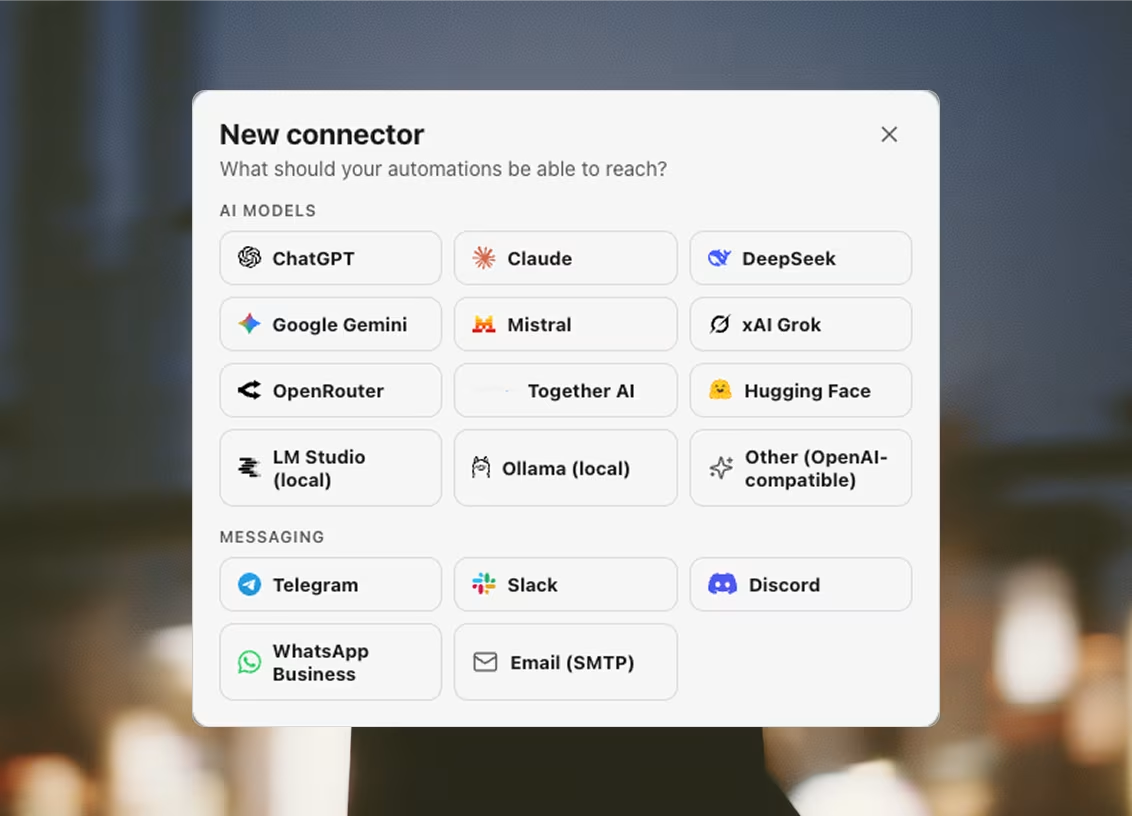
AI models
Asked by the aiPrompt and aiCheck steps. The model box is free text rather than a fixed list — these services rename and retire models faster than a release ships — so the model below is a starting point.
Claude
Anthropic wire- Endpoint
- https://api.anthropic.com
- Model
- claude-sonnet-5
- Needs
- API key
DeepSeek
OpenAI-compatible- Endpoint
- https://api.deepseek.com/v1
- Model
- deepseek-chat
- Needs
- API key
Google Gemini
OpenAI-compatible- Endpoint
- https://generativelanguage.googleapis.com/v1beta/openai
- Model
- gemini-2.5-flash
- Needs
- API key
Mistral
OpenAI-compatible- Endpoint
- https://api.mistral.ai/v1
- Model
- mistral-small-latest
- Needs
- API key
Kimi (Moonshot)
OpenAI-compatible- Endpoint
- https://api.moonshot.ai/v1
- Model
- kimi-k2-0905-preview
- Needs
- API key
Groq (LPU cloud)
OpenAI-compatible- Endpoint
- https://api.groq.com/openai/v1
- Model
- llama-3.3-70b-versatile
- Needs
- API key
Qwen
OpenAI-compatible- Endpoint
- https://dashscope-intl.aliyuncs.com/compatible-mode/v1
- Model
- qwen-plus
- Needs
- API key
OpenRouter
OpenAI-compatible- Endpoint
- https://openrouter.ai/api/v1
- Model
- openai/gpt-4.1-mini
- Needs
- API key
Together AI
OpenAI-compatible- Endpoint
- https://api.together.xyz/v1
- Model
- meta-llama/Llama-3.3-70B-Instruct-Turbo
- Needs
- API key
Hugging Face
OpenAI-compatible- Endpoint
- https://router.huggingface.co/v1
- Model
- meta-llama/Llama-3.3-70B-Instruct
- Needs
- API key
LM Studio
OpenAI-compatible- Endpoint
- http://127.0.0.1:1234/v1
- Model
- local-model
- Needs
- None — it runs on your machine
Ollama
OpenAI-compatible- Endpoint
- http://127.0.0.1:11434/v1
- Model
- llama3.1
- Needs
- None — it runs on your machine
Other
OpenAI-compatible- Needs
- Your own endpoint, and a key if it wants one
Anything that answers POST {base}/chat/completions. You supply the base URL.
Messaging
Where a notify step sends its message, and where a run tells you it finished. One adapter each: unlike model vendors, chat services never converged on a wire format.
Telegram
- Needs
- Bot token and chat ID
From @BotFather. The bot must have messaged the chat once, or be in the group. Group ids are negative numbers.
Where to get a keySlack
- Needs
- Incoming webhook URL
The URL is the credential — anyone holding it can post to the channel.
Where to get a key- Needs
- Cloud API phone number ID, access token, and a recipient
Free-form messages only reach people who messaged this number in the last 24 hours; outside that window WhatsApp requires a pre-approved template.
Where to get a keyEmail (SMTP)
- Needs
- Host, port, from and to — username and password where the relay wants them
Port 465 connects over TLS; anything else starts plain and upgrades with STARTTLS.
Databases and files
Where the saveRows step writes a run's results, and where loadRows reads a work list back out. Every write goes out from the launcher, never from the profile's page — so a row landing in your own database is not billed to an identity's proxy.
Supabase
- Needs
- Project URL and service role key
Use the service_role key, not the anon key — the anon key is subject to row level security and will usually insert nothing without a policy.
Where to get a keyPostgres
- Needs
- Host, database, user and password
TLS is verified by default. Managed databases that present a self-signed certificate need the “require” mode, which encrypts but does not verify.
Firebase
- Needs
- Service account project ID, client email and private key
The service account needs the Cloud Datastore User role. Firestore is schemaless, so columns are free text.
Where to get a keyRedis
- Needs
- Host — password, database number and TLS where the server wants them
Rows are appended to a Redis list as JSON documents, one entry per row, and read back in arrival order. Managed Redis (Upstash, Redis Cloud) is TLS-only — pick verify-full.
Google Sheets
- Needs
- Service account client email and private key, plus the spreadsheet
Share the spreadsheet with the service account’s address as an Editor — a service account has no access to a file until it is shared with it, exactly like a person.
Where to get a keyNotion
- Needs
- Internal integration token
Open each database you want to write to and connect the integration under ••• → Connections. The token alone sees nothing.
Where to get a keyAirtable
- Needs
- Personal access token and the base
The token needs data.records:read, data.records:write and schema.bases:read, and access to this base.
Where to get a keyLocal file
- Needs
- A folder on this machine
csv opens in any spreadsheet app. jsonl appends one object per line and survives a crash mid-run; json rewrites the whole array each time.
Meta Lead Ads
- Needs
- Page or System User access token with leads_retrieval, plus the Page id
Read-only: leads load into automations and datasets; nothing is ever written back to Meta.
Where to get a keyCaptcha solving
What the solveCaptcha step buys an answer from. The step reads the site key off the live page and injects the token back into it, but the request to the provider goes out from the launcher — so it carries neither the profile's proxy nor its cookies, and the provider is told the page's address and its site key and nothing else. This is the one category that spends money per call, so its Test reads the account balance rather than solving anything.
2Captcha
- Needs
- API key
Pay per solve. The page URL and its site key go to the provider from the launcher, not through the profile's proxy.
Where to get a keyCapMonster
- Needs
- A server URL, plus a client key for the cloud one
Two products behind one API: CapMonster Pro runs on your own machine at 127.0.0.1:9090 with no per-solve fee, while CapMonster Cloud is paid and needs the key.
Where to get a keyEmail delivery
What the sendBroadcast step mails through, and the only step allowed to name one. Separate from messaging on purpose: a messaging connector tells you a run finished, this one sends email to other people. It leaves from the launcher's own connection rather than a profile's proxy — the workspace is talking to a vendor it holds an account with, not an identity acting on a site.
Which list may go through it is not a setting. Every provider's acceptable-use policy prohibits cold outreach, purchased lists and scraped contact data, and the penalty is the account rather than a bounce. Cold mail goes out over the sendEmail step and your own mailboxes instead, warmed and capped and routed through each identity's proxy.
Resend
- Needs
- API key, plus a From address on a domain you have verified with Resend
For lists that opted in. Resend's acceptable-use policy prohibits cold outreach and scraped contact data, so cold mail goes out over the Send email step and your own mailboxes instead. Test lists the domains that are actually verified — an unverified From is accepted by the API and then bounces.
Where to get a keyEmail verification
What the verifyEmail step asks whether an address has a mailbox behind it. Four verdicts, and only one of them means send: a catch-all domain accepts everything including mail for boxes that are not there, so it comes back as risky rather than deliverable, and a vocabulary the build does not recognise comes back as unknown. A verifier that guesses yes is worse than none.
Run it before the first message rather than during the campaign. A hard-bounce rate is read directly by every mailbox provider and a sending domain's reputation cannot be turned back once it is spent — so the dead addresses at the top of an imported list cost you the messages at the bottom of it. This is the second category where Test could spend your money, so it reads the credit balance and checks nothing.
MillionVerifier
- Needs
- API key
Pay per address checked, from credits that do not expire. Test reads the remaining balance and verifies nothing.
Where to get a keyZeroBounce
- Needs
- API key
The same check with a wider verdict vocabulary — it separates a spam trap and an abuse address from an ordinary bad one. Pay per address; Test reads the balance.
Where to get a keyServices Argus collects from
These are not connectors, and nothing on this list has a key to paste or an account to hold. They are scrapers — 29 prebuilt collectors, each pointed at one service's public pages, each returning one typed table. They run over plain HTTP with a real browser's TLS fingerprint and open no window, which is why a Maps search that used to take eight minutes now takes about six seconds.




Amazon





Shopify

Indeed

Greenhouse

Ashby
A card can sit inside a workflow as well as on its own tab — the Run scraper step — and it reaches an outside agent as argus_run_scraper, one of the 143 tools above. For a service with no card, an automation driving a real profile is the general answer.
Point an agent at it
Create a key in the launcher, connect your client, and the tools appear in it. The API itself stays on http://127.0.0.1:39219, where only your machine can reach it.