
Explainer
How proxies work in Argus
A profile is only as believable as the address it browses from. This page follows one request end to end: what to buy and how to judge it, the library the proxy lives in, the three things Argus checks before it will use one — that it connects, that the sites you care about accept it, and that the term has not run out — and the two leaks, SOCKS5 auth and WebRTC, that it closes inside the browser itself.
On this page
Why every profile brings its own proxy
Websites read two things about a visitor before anything else: the device the session presents and the network address it arrives from. Argus builds the device half with coherent fingerprints; the proxy is the network half. A profile that logs in from Warsaw today and Buenos Aires tomorrow contradicts itself — so in Argus the proxy is part of the profile's identity, assigned once and applied at the network layer on every launch, not an extension a page can detect or a global setting the whole office shares.
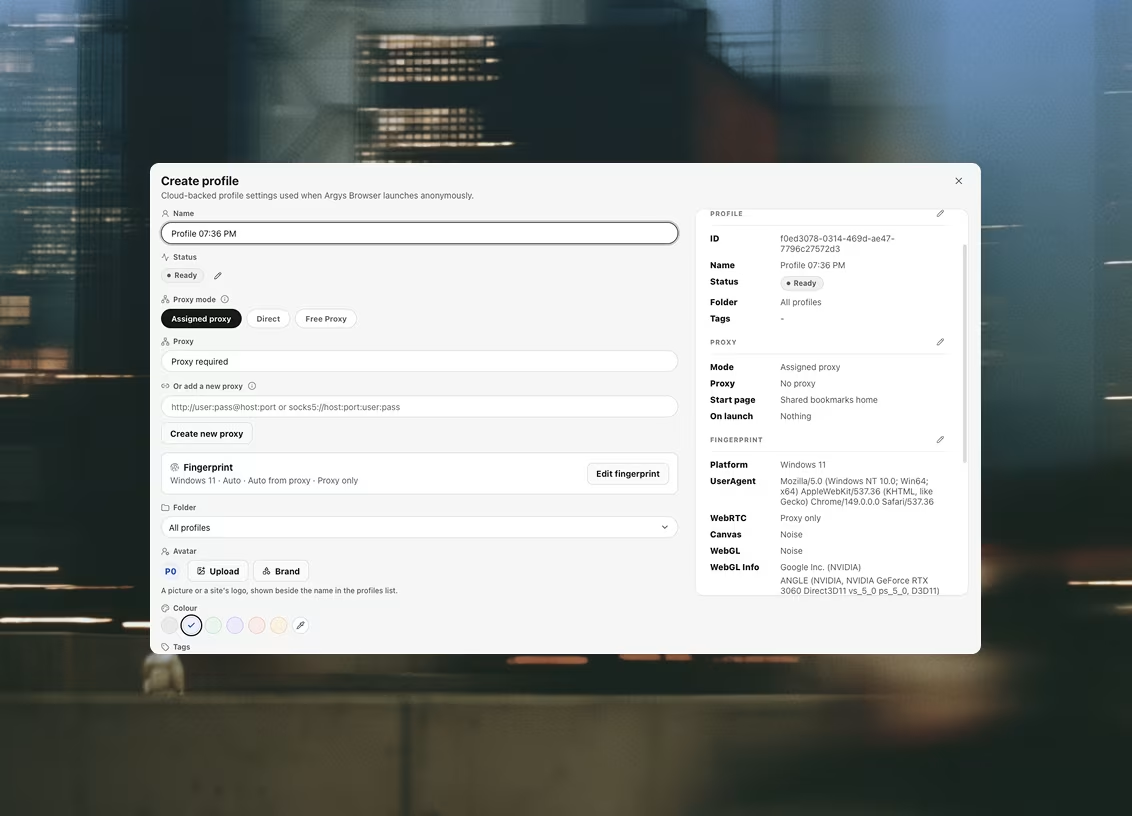
When you create a profile, one dialog sets the whole arrangement: an assigned proxy from your library, a direct connection, or the free option for throwaway work. The preview rail shows exactly what will be stored before you save.
A library, not a text field
Most tools store a proxy as a string pasted into each profile — which is how an agency ends up with the same credentials copied into forty rows and no idea which of them still work. A shared, searchable proxy library with live health checks — not a text field per profile.
- ✓HTTP and SOCKS5, including SOCKS5 that requires a username and password
- ✓Health checks report egress IP, country, and latency
- ✓Checks run automatically for new or failing proxies, concurrently rather than one at a time
- ✓Any proxy can also be re-checked on demand
- ✓A proxy that fails its check blocks the launch instead of leaking your real IP
- ✓The check also flags an exit that sits on a datacenter network, and names the provider behind it
- ✓A slower background sweep loads real sites through each proxy, so a row can name which site refused it — and your workspace picks both the sites and which of them are strict enough to stop a launch
- ✓Record when a proxy's term ends and you are warned a week out, then asked to confirm before launching behind one that has already expired
- ✓CSV bulk import
Because the library syncs to your organization, a proxy added by one teammate is immediately assignable by every other — and your own tooling can manage the pool too, through the local automation API: create, update and delete proxies, or assign one to a profile, from a script or an agent.
Where to buy, and how to judge what you bought
Argus does not sell proxies, so this is a buyer's guide rather than a pitch. Nearly every proxy problem an agency hits traces back to buying the wrong kind for the job, and the wrong kind is usually the one that was cheapest per gigabyte.
The three kinds, and what each is for
Residential proxies exit through consumer ISP connections, which is what account work needs: a login from a residential address in the city the account claims to live in is unremarkable. They are metered, usually a few dollars a gigabyte, and browsing a media-heavy site burns more of that than people expect.
Datacenter proxies are fast and cheap — often a flat monthly price per IP — and they announce themselves. The range they sit on is published, and any site that cares can tell. They are the right tool for fetching public pages at volume and the wrong one for signing into a social account.
Mobile proxies exit through carrier networks, where one address is shared by thousands of real phones. That shared-IP property is what makes them tolerant: a platform cannot ban the address without banning a neighbourhood. They are the most expensive of the three, and worth it for the handful of accounts that genuinely warrant them rather than for a whole pool.
Sticky, not rotating
This is the mistake that costs the most and is easiest to avoid. A rotating endpoint gives you a different exit IP every request or every few minutes, which is what you want for scraping and precisely what you do not want for an account: a session whose address changes mid-scroll looks like a hijacked session, because that is what a hijacked session looks like. For account work buy sticky sessions — a held address, ideally for hours — or dedicated IPs. Ask how long a session can be held before it rotates anyway.
How they are priced
Residential and mobile pools are typically billed by the byte; datacenter IPs by the port, per month. Which one you are on changes how you should run the rest of this page: the destination sweep loads real sites through each proxy, and on a metered plan that traffic is billed like any other — which is exactly why it runs on its own schedule rather than in front of every launch.
What to ask before you pay
- ✓How precise is the targeting — country only, or city and ASN? An account that has always logged in from one city should keep doing so.
- ✓How long does a sticky session hold before the address rotates?
- ✓Is the IP dedicated to you, or shared with whoever else is on the pool right now?
- ✓What are the concurrency limits, and are they per port or per account?
- ✓What happens when an IP is already burnt on the platform you bought it for — is it replaced, and how quickly?
- ✓Is there a trial or a small first top-up? Test against your own platforms before committing to a term.
Red flags
Free and public proxy lists are not an economical version of this — they are open relays whose addresses are on every blocklist worth having, and whoever runs them can read anything not protected by TLS. The subtler problem is a pool sold as residential that answers from a hosting range, which happens often enough that it is worth checking rather than trusting. Argus checks it for you and names the network an exit actually sits on, which is the honest way to find out what you bought — before a client's account goes behind it rather than after.
Bring them from any provider
Argus does not sell proxies and is not tied to anyone who does. Any HTTP or SOCKS5 endpoint works — residential, datacenter or mobile, from whichever provider your team already pays. Import them one at a time or as a CSV, and the health check tells you what you actually bought.




Health checks, and launches that fail closed
Every proxy in the library is checked against the live network: the check reports the egress IP a website will actually see, the country that IP resolves to, and the latency of the hop. Checks run automatically for new and failing proxies — concurrently, so a big import doesn't queue for an hour — and any proxy can be re-checked on demand before an important session.
The rule that matters most is what happens when a check fails: a proxy that fails its check blocks the launch. The session simply does not open, instead of quietly falling back to your real connection and stamping your office IP onto an account that has never seen it. A tool that fails open there has already cost you the account.
The same check reports one thing no amount of fingerprint work can paper over: whether the exit sits on a datacenter network, and which provider runs it. A residential-looking browser arriving from a hosting range is still arriving from a hosting range — and a pool sold as residential that answers from one is worth knowing about before a client's account goes behind it. Argus badges that rather than blocking it. A datacenter exit is a fact to weigh, not automatically a failure.
Reachability is not acceptance
A proxy can connect, resolve to the right country, carry a coherent timezone — and still be served a 403 by Reddit and a checkpoint by Instagram, because its exit IP is on somebody's list. Nothing above measures that: the services a connection check asks are precisely the services that never block anyone.
So Argus asks separately. A slower background sweep loads real destination sites through each proxy and records what each one answered, so a row can name the site that refused it instead of showing a green tick that means nothing. It runs on its own schedule rather than in front of every launch because it costs differently — fetching real pages through a metered residential plan is billed by the byte.
Which sites, and how much each one matters, is your workspace's decision. The default list is five. Two of them gate a launch — a Cloudflare trace endpoint, the cheapest possible proof that ordinary HTTPS survives the proxy, and Google, because a proxy Google refuses is broadly burnt rather than narrowly inconvenient. The other three only badge it: Reddit, Instagram and Facebook block aggressively and recover on their own. The workspace owner can edit that list, and a pool bought for one platform can carry a list of its own so it is judged on the platform it was bought for.
A proxy that a required site refuses is marked failed, and launching a profile behind it asks you to confirm first, naming what refused it. A proxy that only an optional site refuses — or whose exit is a datacenter — is marked degraded, which is a badge and never a stopped launch. That line is the whole point: a warning that appears on every launch is a warning nobody reads.
The date the proxy stops being yours
A proxy's term ends on a date nothing in the network can tell you. The host keeps resolving, the credentials keep being sent, and the first anyone hears of the expiry is a session that dies part-way through — or an automation that does, which is the expensive version.
So the date is a field on the proxy: type it into the row or the editor when you buy the term. Argus writes you a notification a week before it ends and again once it has, skips the expired proxy in the background sweep — there is nothing left to measure — and asks you to confirm before launching a profile behind one, because what happens next is an invoice rather than a proxy problem you can debug. A proxy with no date recorded reads as “no known term” and gates nothing.
It is also the one field that editing the credentials does not clear. Everything else the library stores about a proxy is an observation of the current egress, and a new host or password invalidates all of it at once — but the end of a contract is not an observation of the egress, and discarding it there would throw away the one thing nothing can measure again.
Authenticated SOCKS5, handled inside the browser
The clearest reason Argus ships its own browser instead of automating someone else's. Chromium — the engine under nearly every anti-detect tool — only speaks the no-auth variant of SOCKS5, so a proxy that requires a username and password cannot be used with it at all. Argus ships its own build of the browser, and closes this there:
- ✓Chromium's own SOCKS5 client only speaks the no-auth variant, so a proxy that needs a username and password simply cannot be used
- ✓Argus runs a local relay that performs the RFC 1929 handshake on the upstream leg
- ✓The profile is pointed at a loopback address, so no proxy authentication dialog ever appears
- ✓This is not a workaround layered on top — it lives inside the browser process
WebRTC cannot leak around it
A proxy only covers the traffic that goes through it. WebRTC is the classic way around one: a page asks the browser to negotiate a peer connection and reads your real address out of the candidates, proxy or no proxy. Your real address does not escape through WebRTC, and a page cannot switch that off.
- ✓Enforced as browser policy on the profile, beneath the JavaScript layer
- ✓Applied to every profile — it is not a toggle you can forget to set
- ✓Assigning a proxy to a profile that was still reporting its real address upgrades it automatically
See it with your own proxies
Download the launcher, import your pool, and watch the health checks come back.