参考
集成
Argus 支持 Model Context Protocol,所以一个本来就会用工具的 Agent 不必先学一套 API,就能驱动你的环境。连接过程不安装任何东西。
本页内容
通过 MCP 接入的 Agent
MCP 是编程 Agent 了解一个程序能做什么的方式。Agent 请求工具列表,拿回一份带名称、描述和参数结构的清单,然后调用它需要的那些——没有封装层,没有 SDK,也没有任何需要跟着更新日志同步的东西。
Argus 的服务器运行在启动器自身的应用包内部,以 ELECTRON_RUN_AS_NODE 启动。没有要安装的包,也没有新的东西在监听端口:它通过 stdin 和 stdout 用 JSON-RPC 与启动它的客户端对话,并代表你访问本地 API。
对大多数客户端,启动器会替你写好配置文件,并先把路径给你看。有两个客户端没有可写的配置文件,于是改为直接给出一段可粘贴的配置。
这是一个本地 API。它在运行 Argus 的那台机器上监听回环地址,机器之外的任何东西都到不了它。不存在托管在网上的 Web API。
API 和 MCP 工具在所有套餐上都可用,包括 Free。套餐决定一个工作区能有多少个环境、席位和自动化流程,但不决定 API 是否响应。 这台服务器是什么、Agent 通过它能够到什么、它的边界在哪里,都在 MCP 页上;这里往下讲的是接线。
支持的客户端
编码智能体

Claude Code
Anthropic 的编码智能体命令行工具。在任意项目里把浏览器环境当作工具来驱动。
- 配置文件
- ~/.claude.json
- 键名
- mcpServers.argus
在任意项目里执行 /mcp,列表中应当出现 argus。

Codex
OpenAI 的编码智能体命令行工具。同一套工具,写进 Codex 自己的配置。
- 配置文件
- ~/.codex/config.toml
- 键名
- [mcp_servers.argus]
Codex 在启动时读取 MCP 服务器列表——问它有哪些工具,argus 的那些应当在其中。

Cursor
AI 代码编辑器。注册在 Cursor 的全局 MCP 配置里。
- 配置文件
- ~/.cursor/mcp.json
- 键名
- mcpServers.argus
打开 Cursor Settings → MCP:argus 应当在列表中并已启用。

Gemini CLI
Google 的编码智能体命令行工具。同一套工具,写进它自己的设置文件。
- 配置文件
- ~/.gemini/settings.json
- 键名
- mcpServers.argus
执行 /mcp,列表中应当出现 argus。

Windsurf
Codeium 出品的编辑器。注册后供 Cascade 使用。
- 配置文件
- ~/.codeium/windsurf/mcp_config.json
- 键名
- mcpServers.argus
打开 Cascade 的插件面板:argus 应当列在其中。

VS Code
Visual Studio Code 的 Agent 模式,通过它的用户级 MCP 配置接入。
- 配置文件
- Code/User/mcp.json
- 键名
- servers.argus
把聊天切到 Agent 模式并打开工具选择器——argus 的工具应当列在其中。

Zed
Zed 的 Agent 面板,通过它的上下文服务器设置接入。
- 配置文件
- ~/.config/zed/settings.json
- 键名
- context_servers.argus
查看 Agent 面板的设置:argus 应当出现在上下文服务器里。
自动化

OpenClaw
横跨多个聊天渠道的个人助理网关。
- 配置文件
- ~/.openclaw/openclaw.json
- 键名
- mcp.servers.argus
它在启动时加载配置——argus 应当出现在它的工具里。
手动配置
这两个没有 Argus 能替它们写的配置文件。接它们,就是把一段配置交到你手上,而不是假装已经替你接好了。
Hive
手动多智能体运行环境。一次对大量浏览器环境跑质检与监控。
- 配置文件
- its own .env
- 键名
- environment variables
Hive 在启动时读取 .env——它的第一轮巡检就会用上这把密钥。

Any other MCP client
手动任何会说 MCP 的客户端。自己把服务器配置块复制进它的配置文件。
- 配置文件
- whatever your client reads
- 键名
- mcpServers.argus
重启之后,你的客户端应当把 argus 列在它的 MCP 服务器里。
手动配置
上面除了 Hive 和「Any other MCP client」之外,Argus 都会替你写好这个块,并在动手之前先把文件路径给你看。如果你更愿意自己来,或者你的客户端不在名单上,它就是这个形状。
{
  "mcpServers": {
    "argus": {
      "type": "stdio",
      "command": "Argus Launcher",
      "args": ["<the path shown after you connect>"],
      "env": {
        "ELECTRON_RUN_AS_NODE": "1",
        "ARGYS_API_TOKEN": "<your key>",
        "ARGYS_API_BASE": "http://127.0.0.1:39219"
      }
    }
  }
}
Hive 则改为从它自己的 .env 里读取环境变量:
ARGYS_API_BASE=http://127.0.0.1:39219
ARGYS_API_TOKEN=<your key>
配完之后重启客户端。它们每一个都在进程启动时读取自己的 MCP 配置,而 Argus 没有可发的重载信号。
Agent 拿到什么
143个工具,以及服务器在连接时交给模型的那段说明:
驱动 Argus 防关联浏览器环境。每个环境都是一个相互隔离的浏览器身份,拥有自己的代理、指纹和 Cookie 存储。惯常流程:argus_list_profiles,然后 argus_launch_profile,然后 argus_navigate / argus_read_page / argus_screenshot,最后 argus_close_profile。启动后的会话会带上该环境已有的全部身份,包括它的 Cookie——不要把这个环境本不该拥有的东西交给它。启动的返回里带有一个 `warnings` 数组:非空就意味着该环境共享它的 Cookie 集或代理已超出上限,请告知用户,而不是闷头开一整批;开批之前先调用 argus_sharing_report,一次调用就能看到全貌。这个工作区里还可能有「项目」:横跨环境、代理和自动化流程的具名工作,每个项目有自己的目标、一套规则,以及应用内助手为它维护的笔记和操作手册。用 argus_list_projects 查看有哪些项目,用 argus_project_context 取某个项目的简介和规则——在动这个项目的任何东西之前先读它们,因为它的约束就写在那里。其余文档都以资源形式暴露(argus://project/<id>/<path>),所以先列出它们,只读你需要的那几份。argus_delegate 把一个目标交给 Argus 自己的编排器,它已经载入了该项目的上下文。
有127个工具包着一个接口
argus_list_profilesList profiles (optional ?folder=<id>)
argus_get_profileRead one profile
argus_create_profileCreate a profile
argus_update_profileUpdate name, status, tags, colour, avatar, folder, proxy mode, start URL or launch automation
argus_profile_notesRead a profile's notes, newest first
argus_add_profile_noteAppend a note to a profile
argus_assign_proxyPut a profile on a proxy from the library
argus_sharing_reportEvery cookie-set and proxy shared past its limit, with the limits themselves
argus_launch_profileOpen a profile for automation; returns its CDP url. Reuses a running session unless relaunch is set
argus_profile_sessionWhere a running profile's CDP endpoint is, without launching it
argus_close_profileClose a session this key opened
argus_delete_profileMove a profile to Trash (permanent: true to purge; the tool only soft-deletes)
argus_update_fingerprintRe-roll or override a profile's fingerprint
argus_fingerprint_checkCheck a running profile's fingerprint
argus_list_proxiesList proxies
argus_create_proxyAdd proxy
argus_update_proxyUpdate a proxy
argus_check_proxyCheck reachability and egress IP
argus_delete_proxyRemove a proxy
argus_reimport_proxiesRe-import proxies from a list of rows
argus_assign_cookie_setSet which profiles launch with a cookie-set
argus_unassign_cookie_setDetach profiles from whatever cookie-set they hold
argus_list_cookie_setsThe workspace's cookie sets, metadata only
argus_update_cookie_setChange a cookie set's name, status, colour, folder or tags
argus_trash_cookie_setsMove cookie sets to Trash
argus_list_trashed_cookie_setsThe cookie sets currently in Trash
argus_restore_cookie_setsBring cookie sets back out of Trash
argus_purge_cookie_setsPermanently delete cookie sets from Trash
argus_list_automationsList the org's automations, with step counts
argus_list_recipesList the prebuilt recipes, and which ones this workspace has set up
argus_set_up_recipeCreate one prebuilt recipe, plus any tables it needs
argus_list_scrapersThe scraper catalogue, and what this workspace has run
argus_get_scraperOne scraper's form and the columns it produces
argus_sample_scraperA dry run: one page, nothing written
argus_run_scraperRun a scraper; returns a run id immediately
argus_scraper_runsPast runs of one scraper, newest first
argus_automation_schemaThe step catalogue: every step type, its fields and how they validate
argus_get_automationRead one automation, including its full step tree
argus_create_automationCreate an automation. Steps are validated before anything is stored
argus_update_automationChange an automation's name, description, steps or wiring
argus_delete_automationMove an automation to Trash. It stops running on launch and on its schedule
argus_run_automationRun an automation against a profile, launching it if needed
argus_automation_runsRecent runs of one automation, with status and errors
argus_list_schedule_entriesEvery scheduled workflow in the workspace
argus_create_schedule_entryCreate a scheduled workflow or AI task
argus_update_schedule_entryChange a scheduled entry's time, steps, prompt, colour or enabled state
argus_delete_schedule_entryDelete a scheduled workflow
argus_schedule_historyWhat the calendar actually ran over a range of days
argus_keep_awakeWhether this computer is being held awake for the schedule
argus_set_keep_awakeHold this computer awake so scheduled runs are not missed
argus_schedule_notificationsWhether the signed-in user hears about their scheduled days
argus_set_schedule_notificationsTurn the schedule's Telegram messages on or off
argus_list_event_triggersEvery event trigger in the workspace
argus_create_event_triggerCreate an event trigger
argus_update_event_triggerChange an event trigger's watch settings, target or enabled state
argus_delete_event_triggerDelete an event trigger
argus_list_datasetsThe workspace's datasets, with their declared columns
argus_create_datasetCreate a dataset, optionally with starting columns
argus_update_datasetChange a dataset's name, icon, colour or folder
argus_update_dataset_schemaReplace a dataset's declared column list
argus_update_dataset_optionsEdit one choice column's options
argus_sample_rowsA page of a dataset's rows
argus_query_rowsQuery a dataset's rows by where conditions, optionally aggregated
argus_add_rowsAppend rows to a dataset
argus_update_rowsRewrite dataset rows in place by id
argus_delete_rowsDelete dataset rows by id or by a where filter
argus_trash_datasetsMove datasets to Trash
argus_list_trashed_datasetsThe datasets currently in Trash
argus_restore_datasetsBring datasets back out of Trash
argus_purge_datasetsPermanently delete datasets from Trash
argus_list_projectsThe workspace's projects, what each holds, and the index of its brain
argus_project_contextOne project's goal, brief and rules, plus the titles of its other documents
argus_delegateHand a goal to Argus's own orchestrator, inside a project's context
argus_list_connectorsThe workspace's connectors, and the field list of every kind
argus_create_connectorAdd a connector. Owner-only, like the Connectors view
argus_update_connectorRename a connector, change its config or make it the default
argus_delete_connectorDelete a connector
argus_test_connectorSend a real test message, or a one-word AI completion
argus_list_foldersThe folders profiles, proxies, cookie sets and automations are filed in
argus_list_statusesEvery status label a profile, proxy or cookie set can carry
argus_get_proxy_share_limitThis machine's proxy-sharing threshold
argus_set_proxy_share_limitChange this machine's proxy-sharing threshold
argus_telegram_statusWhether the notification bot is set up, and who is subscribed
argus_set_telegram_prefSubscribe the signed-in user to one automation's outcomes
argus_set_telegram_botSet the workspace's notification bot. Owner-only
argus_table_columnsWhat each table shows, and every column it could show
argus_set_table_columnsShow or hide columns on a table
argus_skills_schemaThe vocabulary a skill is written in: tool packs, entry tabs, shelf ids
argus_list_skillsList the assistant's skills, built-in and custom
argus_get_skillRead one skill, including its full brief
argus_save_skillCreate a custom skill, or edit a built-in one
argus_delete_skillDelete a custom skill, or reset a built-in to its shipped brief
argus_trash_profilesMove profiles to the trash
argus_list_trashed_profilesProfiles currently in the trash
argus_restore_profilesRestore profiles from the trash
argus_purge_profilesDelete trashed profiles permanently
argus_switch_tabBring one of a profile's tabs to the front
argus_new_tabOpen a new tab in a launched profile
argus_page_recordingWhat has been done to this page so far
argus_save_page_recordingSave what was done to a page as an automation
argus_dedupe_rowsRemove duplicate rows
argus_search_automationsFind automations by name, step or connector
argus_automation_summaryWhat one automation does, without its full document
argus_schedule_dayOne day of the calendar
argus_trigger_historyWhat has fired recently
argus_create_projectStart a project
argus_add_to_projectPut records into a project
argus_remove_from_projectTake records out of a project
argus_read_project_docRead one project document
argus_write_project_docWrite a project document
argus_delete_project_docDelete a project document
argus_make_planLay out a multi-step plan
argus_delegate_manyHand several goals to subagents at once
argus_list_mailboxesThe mailboxes this workspace can read
argus_list_messagesList a mailbox folder
argus_read_messageRead one message
argus_read_new_messageWait for a message that has not arrived yet
argus_open_composeStart a draft
argus_list_composeDrafts that are open right now
argus_set_compose_fieldsFill in a draft
argus_send_composeSend a draft
argus_close_composeDiscard a draft
argus_list_docsThe knowledge-base index
argus_read_docRead one knowledge-base article
argus_search_docsSearch the knowledge base
argus_get_contextWhat this workspace actually holds
argus_recent_errorsWhat has gone wrong lately
有16个直接驱动页面,背后没有任何接口
argus_connection_statusConfirm this MCP connection works, and say as whom
argus_page_snapshotThe interactive elements on a page, each with a selector to act on it
argus_clickClick an element, or a point, in a running profile's page
argus_typeType into a field in a running profile's page
argus_press_keyPress a single key in a running profile's page
argus_scrollScroll a running profile's page
argus_wait_forWait until a page reaches a condition
argus_extractRead values out of a running profile's page
argus_select_optionChoose an option in a dropdown
argus_list_tabsList the open pages in a running profile
argus_navigatePoint a page at a URL and wait for it to settle
argus_go_backGo back, or forward, in a page's own history
argus_reloadReload a page and wait for it to settle
argus_read_pageRead a page's visible text, whole or by CSS selector
argus_screenshotScreenshot a page — JPEG by default, PNG on request
argus_evalEvaluate a JavaScript expression in a page and return its value
还有3个接口根本没有对应的工具——那些破坏性的和批量的。它们列在 API 参考里,标着 HTTP only。
自动化连接器
连接器是自动化流程可以触及的外部服务:一个用来提问的模型、一个发送答案的去处,以及一次运行产出的数据行的落脚点。步骤里只保存连接器的 id,别的什么都不存,所以密钥只在一个地方改,用到它的每一条自动化流程都跟着变。
十二个 AI 条目一共只用了两种通信协议。其中十一个说 OpenAI 的 chat-completions 格式,因为它们各自都提供了 OpenAI 兼容的端点;真正不一样的只有 Claude。十二个里有两个跑在你自己的机器上,完全不需要密钥。
数据连接器是「保存数据行」和「载入数据行」这两个步骤指向的地方。每个连接器除了凭据之外还带着自己的容器——Sheets 连接器持有电子表格,Airtable 连接器持有 base——所以一个步骤只需要指名一张表、一个标签页、一个键或一个文件。
验证码连接器是「破解验证码」步骤购买答案的地方。同样是两个条目、两种通信协议,因为这个市场上的每家服务都抄了其中之一。这是唯一按调用花钱的类别,所以它的「测试」只读取账户余额,不会真的去解一道题——而两者之一的 CapMonster Pro 跑在你自己的机器上,每次破解完全不收费。


















连接器的凭据保存在你的工作区里,工作区内任何能打开连接器列表的人都读得到——而且它们会经由本地 API 原样返回,所以一把 Argus API 密钥等同于它能读到的那些凭据。Argus 在自己的界面里会把它们打码,但那只是方便,不是安全边界——给连接器的密钥,应当是该服务肯签发的最窄的一把。
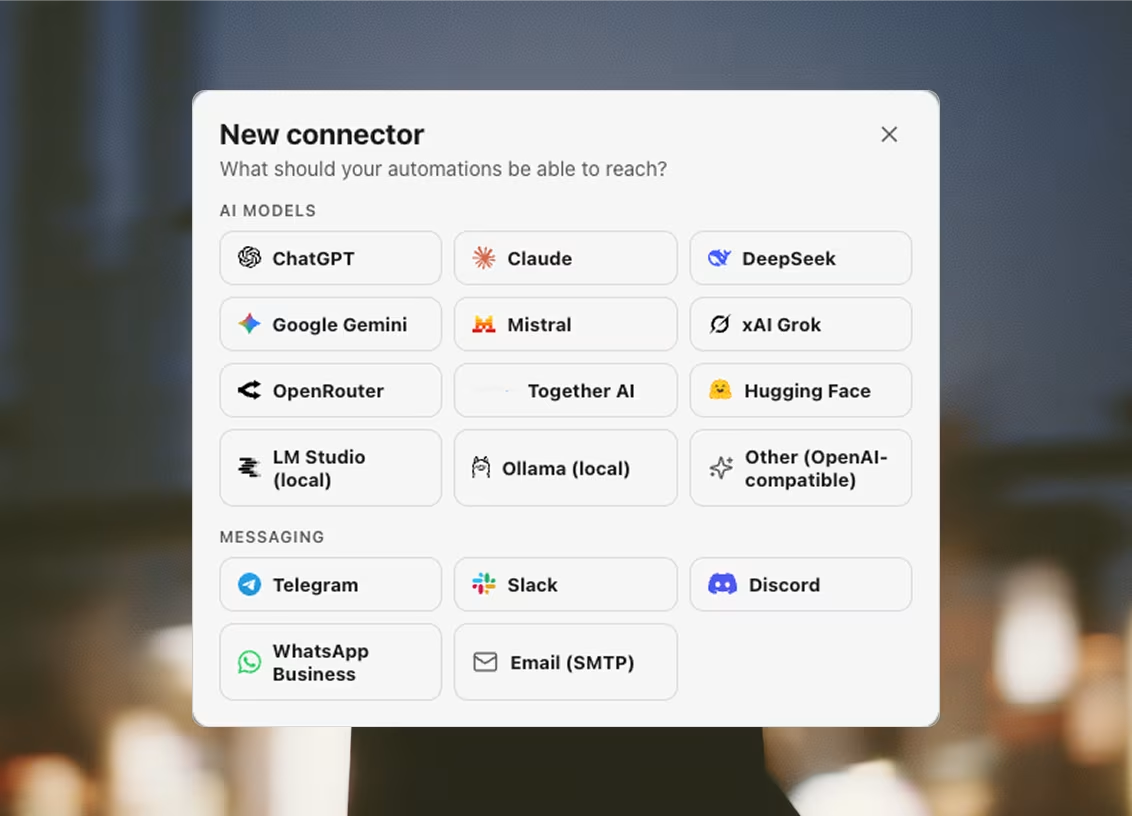
AI 模型
由 aiPrompt 和 aiCheck 两个步骤调用。模型这一栏是自由文本,而不是固定列表——这些服务改名和下线模型的速度,比一个版本发出来还快——所以下面写的模型只是一个起点。
Google Gemini
兼容 OpenAI- 接口地址
- https://generativelanguage.googleapis.com/v1beta/openai
- 模型
- gemini-2.5-flash
- 需要
- API 密钥
Together AI
兼容 OpenAI- 接口地址
- https://api.together.xyz/v1
- 模型
- meta-llama/Llama-3.3-70B-Instruct-Turbo
- 需要
- API 密钥
Hugging Face
兼容 OpenAI- 接口地址
- https://router.huggingface.co/v1
- 模型
- meta-llama/Llama-3.3-70B-Instruct
- 需要
- API 密钥
LM Studio
兼容 OpenAI- 接口地址
- http://127.0.0.1:1234/v1
- 模型
- local-model
- 需要
- 无需凭据——它运行在你自己的机器上
Ollama
兼容 OpenAI- 接口地址
- http://127.0.0.1:11434/v1
- 模型
- llama3.1
- 需要
- 无需凭据——它运行在你自己的机器上
Other
兼容 OpenAI- 需要
- 你自己的接口地址;如果它要密钥,再加一把密钥
任何能响应 POST {base}/chat/completions 的服务。基础地址由你填写。
消息通知
notify 步骤把消息发到哪里,一次运行结束时又从哪里告诉你。每个服务一个适配器:和模型厂商不同,聊天服务从来没有统一过通信格式。
- 需要
- Cloud API 的电话号码 ID、访问令牌,以及一个收件人
自由格式的消息只能发给过去 24 小时内给这个号码发过消息的人;超出这个窗口,WhatsApp 要求使用预先审核过的模板。
去哪里拿密钥Email (SMTP)
- 需要
- 主机、端口、发件人和收件人——中继若要求,再加用户名和密码
465 端口直接以 TLS 连接;其他端口先明文连接,再通过 STARTTLS 升级。
数据库与文件
saveRows 步骤把一次运行的结果写到哪里,loadRows 又从哪里把工作清单读回来。所有写入都从启动器发出,绝不从浏览器环境的页面发出——所以落进你自己数据库的一行,不会记到某个身份的代理账上。
Supabase
- 需要
- 项目 URL 和 service role 密钥
要用 service_role 密钥,不要用 anon 密钥——anon 受行级安全策略约束,没有对应策略时通常什么也写不进去。
去哪里拿密钥Postgres
- 需要
- 主机、数据库、用户和密码
默认会校验 TLS。使用自签名证书的托管数据库需要 require 模式:它只加密,不校验。
Firebase
- 需要
- 服务账号的项目 ID、client email 和私钥
服务账号需要 Cloud Datastore User 角色。Firestore 没有固定表结构,因此列名是自由文本。
去哪里拿密钥Redis
- 需要
- 主机——服务器若要求,再加密码、数据库编号和 TLS
行会以 JSON 文档的形式追加进一个 Redis 列表,一行一条,读回时按写入顺序。托管 Redis(Upstash、Redis Cloud)只走 TLS——请选 verify-full。
Airtable
- 需要
- 个人访问令牌和对应的 base
令牌需要 data.records:read、data.records:write 和 schema.bases:read 权限,并且能访问这个 base。
去哪里拿密钥Local file
- 需要
- 本机上的一个文件夹
csv 用任意表格软件都能打开。jsonl 每行追加一个对象,运行中途崩溃也不会丢;json 每次都重写整个数组。
验证码破解
solveCaptcha 步骤向谁买答案。这个步骤从实时页面上读出 site key,再把令牌注回页面,但发给服务商的请求是从启动器出去的——既不带浏览器环境的代理,也不带它的 Cookie,服务商只被告知页面地址和它的 site key,别的什么都没有。这是唯一一类按次花钱的连接器,所以它的 Test 读的是账户余额,而不是真去破一个码。
邮件投递
sendBroadcast 步骤通过谁把邮件发出去,而且它是唯一被允许指定这类连接器的步骤。和消息通知分开是有意的:消息连接器是告诉你一次运行结束了,而这一类是把邮件发给别人。它走的是启动器自己的网络连接,而不是某个浏览器环境的代理——这是工作区在和一个自己持有账号的厂商对话,不是某个身份在网站上行动。
哪一份名单可以走它,不是一个开关。每家服务商的使用条款都禁止冷邮件、外购名单和抓取来的联系人数据,而代价是账号本身,不只是一封退信。冷邮件要改走 sendEmail 步骤和你自己的邮箱:先养号、设上限,并且经由每个身份各自的代理发出。
Resend
- 需要
- API 密钥,以及一个在 Resend 完成域名验证的发件地址
只用于已获许可的名单。Resend 的使用条款禁止冷邮件和抓取来的联系人数据,所以冷邮件要走 Send email 步骤和你自己的邮箱。Test 会列出真正通过验证的域名——未验证的发件地址 API 照收,之后就退信。
去哪里拿密钥邮箱验证
verifyEmail 步骤向谁询问一个地址背后是否真有邮箱。判定有四种,其中只有一种意味着可以发:catch-all 域名连不存在的邮箱的信都照收,所以它会被判为风险,而不是可送达;构建不认识的判定词汇则回作未知。一个会瞎猜「是」的验证服务,比没有还糟。
在发出第一封之前跑,而不是在活动进行中跑。硬退信率每一家邮箱服务商都会直接读取,而发信域名的声誉一旦耗掉就回不来了——所以导入名单开头的那些死地址,代价是名单末尾那些本可送达的邮件。这是第二类 Test 有可能花你钱的连接器,所以它只读额度余额,什么也不检查。
Argus 能采集的服务
这些不是连接器,这份名单上没有任何一项要你粘贴密钥或持有账号。它们是采集器——29个预置的采集卡片,每一个对准一个服务的公开页面,各自返回一张有固定字段的表。它们走普通 HTTP,带着真实浏览器的 TLS 指纹,一个窗口都不开——这也是为什么一次 Maps 搜索从过去的八分钟变成了大约六秒。




Amazon





Shopify

Indeed

Greenhouse

Ashby
一张卡片除了待在自己的标签页里,也能放进一条工作流——就是 Run scraper 步骤——而它到了外部 Agent 那里就是 argus_run_scraper,上面143个工具中的一个。对于没有现成卡片的服务,通用答案是让自动化流程去驱动一个真实的浏览器环境。